If you’re asked about your driving history when hiring a car or arranging insurance, you may need to perform a driver licence check. The good news is that you can do this online in just a couple of minutes – with the safety of knowing it’s an official government website.
The service is managed by the Driver and Vehicle Licensing Agency (DVLA) and is quick and easy to use — here’s how.
How do I check my licence?
Don’t be fooled by some of the sponsored posts and third-party services offering to do this at the top of search results. There are many parasitic companies who’ll offer to do a driving licence check for a fee, whereas the DVLA’s official check code service keeps your data secure and won’t cost you a penny.
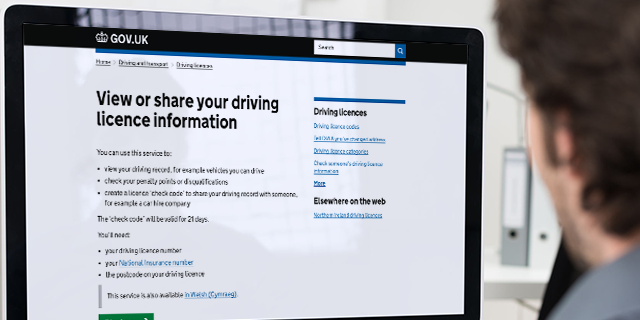
Head to the official driving licence check service at Gov.uk. It’s quick and easy to use, whether you access it on desktop or mobile. It only takes a couple of minutes of your time to complete the process.
A driver licence check involves searching various government databases. It lets you see at a glance the types of vehicles you can drive according to your licence type, any penalty points accrued for infringements such as speeding, plus any periods of disqualification. You can also read our guide to driving offence codes and penalties.
To access the DVLA licence check service, you’ll need:
- Your driving licence number (you can find this on line 5 on your UK photocard licence)
- Your National Insurance (NI) number
- The postcode on your driving licence
What is a driving licence check code?
A check code lets you share your driving record with others, for example with a car hire company, which might need to check you are entitled to drive certain types of car before handing over the keys.
If you’re asked for a check code, bear in mind they’re only valid for 21 days, after which time you’ll need to apply for a new one.

Once you’ve entered your details, you will then see a page with all your driving licence details, a tab outlining the cars, motorbikes, vans and even minibuses that you’re entitled to drive, as well as a tab detailing any penalties or disqualifications logged against your licence.
The final tab is called “Get your check code” and this is where you can generate a licence check code to show to an employer or car hire company. If you then select “Print” you can download a PDF document, which is valid for 21 days. This is useful to print out and take with you in your holiday paperwork, in case you need to prove your licence is clean and you’ve no signal at the rental car check-in desk.
Can I check my driving licence number online?
We’d recommend doing the check online. If you can’t find your driving licence number, you can check it using your National Insurance number at Gov.uk, view driving record.
If you’ve lost your licence and don’t know what your NI number is, you can order a replacement online at Gov.uk, replace a driving licence.
You can also request licence checks over the telephone. If you don’t have internet access, simply call the DVLA helpline on 0300 083 0013 from 8am to 7pm (Monday to Friday) or 8am to 2pm (Saturday) and an operator will talk you through the process in person.
Do car insurance companies need to check my licence?
You may be asked for your driving licence number when shopping for a renewal, which can then be used to check your driving record using the MyLicence database.
You’re not obliged to share your driving licence number with an insurance company, but it is a quick way for policy providers to get the most accurate information about you. This can help them to work out a fair and appropriate premium based on your specific driving history.
You can also ensure you get the best deals on car cover by comparing quotes right here at mustard.co.uk. Simply fill in our online form.